Marketing today requires more than just eye-catching designs or snappy headlines—it’s about delivering consistent, compelling content that connects with audiences across platforms. But crafting engaging ad creatives, writing on-brand copy, and finding the perfect visuals for each new marketing campaign can feel like a never-ending cycle. Enter AdCreative.ai, an AI-powered platform with a range of features that simplifies ad creation while maintaining a high level of creativity and professionalism.
Designed for marketers, small businesses, and e-commerce owners, AdCreative.ai enables users to generate optimized ads, text, and visuals based on actionable insights with minimal effort. Whether you need a scroll-stopping Facebook ad, a sleek Instagram post, or fresh product visuals, this tool has you covered.
This post may include affiliate links—if you buy through them, we earn a commission at no extra cost to you. Thanks for your support! 🚀
How AdCreative.ai Works
AdCreative.ai harnesses artificial intelligence across the creation process to streamline ad designs, product images, and ad copy tailored to your goals. Here’s how it works:
- Provide Input: Upload your logo, product images, or brand guidelines to start the creative process.
- Select Your Focus: Choose the type of content you need—visual ads, product photos, headlines, or stock images.
- Let AI Work Its Magic: The platform analyzes your input to generate on-brand creatives and text, optimized for performance and audience engagement.
- Refine and Download: Customize the results as needed, and download polished assets ready for deployment.
The process is quick, intuitive, and ensures your brand stays front and center throughout.
Powerful AdCreative.ai Features: What Makes It Stand Out

AdCreative.ai offers an impressive suite of tools for creative production. Here’s what makes it a standout in the AI marketing space:
1. AI-Generated Ad Creatives
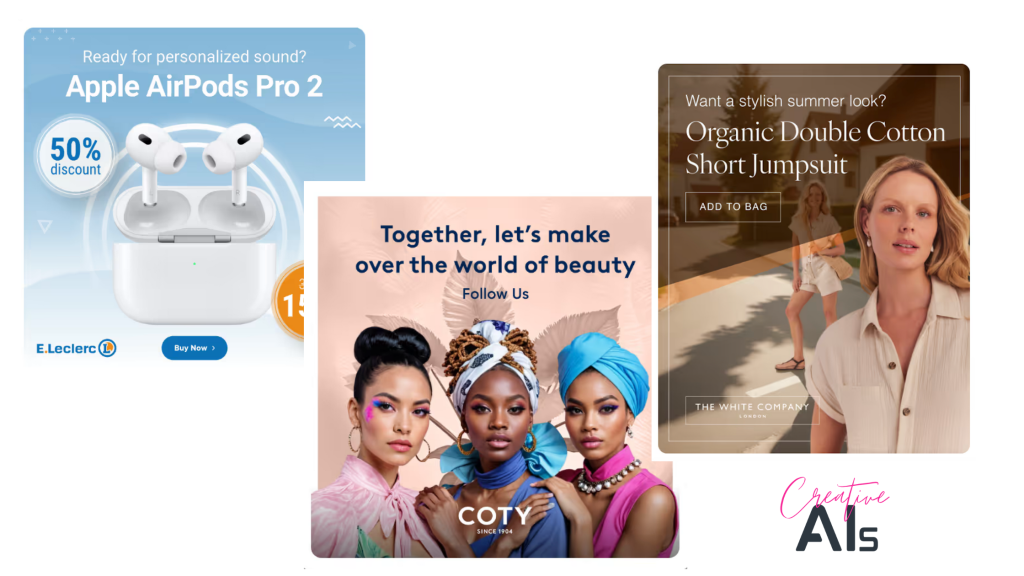
The platform designs high-quality, conversion-focused ad creatives tailored to specific platforms like Facebook, Google, or Instagram. It considers industry trends, your target audience, and your branding, saving you hours of design work.
2. Intelligent Text Generation
Writing ad copy can be a struggle, but AdCreative.ai simplifies it by generating headlines, captions, and taglines that align with your brand’s tone. The AI uses a variety of copywriting methodologies for copy that grabs attention and drives action.
3. Product Photoshoots Without the Studio
AdCreative.ai’s product photoshoot tool creates realistic, professional-quality product images using only your uploaded photos. It’s perfect for e-commerce businesses looking to showcase items in styled environments without the overhead costs of a real photoshoot.
Recommended reading: Agentic AI: Expanding the Creative Professional’s Toolbox
4. Fashion Photoshoots for Apparel Brands
For fashion businesses, AdCreative.ai offers a specialized tool to generate on-trend product visuals. This feature is particularly useful for creating lifestyle photos or promotional campaigns, and you can use the creative for traditional advertising or online campaigns.
5. Stock Images Tailored to Your Needs
AdCreative.ai’s stock image generator produces unique visuals designed to complement your campaigns. Instead of generic photos, your advertising efforts get images that align with your brand’s aesthetics and message.
6. Creative Insights for Better Results
Built-in analytics provide recommendations on how to improve your creatives for better ad performance. Whether it’s tweaking colors, copy, or design elements, AdCreative.ai ensures you’re always optimizing.
Who Will Benefit Most from AdCreative.ai?
AdCreative.ai is a versatile tool that caters to various user groups, making it a valuable asset for anyone who wants to produce professional-quality ad creatives quickly and efficiently. Use it for consistent brand representation across social media posts, attention-grabbing headlines, video ads, and more. From e-commerce brands to individual content creators, here’s how different audiences can benefit from the platform, along with real-world examples of its use cases.
E-Commerce Brands
For e-commerce businesses, visual appeal and attention-grabbing content are critical for driving conversions. AdCreative.ai enables brands to create professional ad visuals, product shots, and promotional content that resonate with shoppers and encourage clicks.
For instance, an online jewelry store can use the product photoshoot feature to generate styled images of their necklaces and earrings without the need for a physical photoshoot. These visuals can then be paired with AI-generated headlines like “Sparkle Every Day” or “Perfect Gifts for the Holidays” to craft an effective Facebook or Instagram campaign. The platform’s ability to tailor designs for different channels ensures that your ads look polished whether they’re appearing on Google, TikTok, or Pinterest.
Small Businesses
Small businesses often face resource constraints, lacking the budget for professional designers or extensive marketing teams. AdCreative.ai provides a cost-effective solution, allowing small business owners to create high-quality marketing materials that rival those of larger competitors.
Imagine a local café launching a new seasonal menu. Using AdCreative.ai, the owner can design visually appealing ads showcasing their new offerings, complete with custom typography and vibrant imagery. Paired with a catchy, AI-generated headline like “Warm Up with Our Winter Specials,” these ads can be deployed across multiple platforms, saving time and boosting customer engagement without the need for external support.
Digital Marketers
Digital marketers juggle numerous tasks, from managing campaigns to analyzing performance metrics. AdCreative.ai simplifies the creative process by automating the design of ad visuals and the generation of ad copy, freeing marketers to focus on strategy and analytics.
For example, an agency managing a client’s fitness brand campaign can quickly create multiple ad variations tailored to different demographics. Using A/B testing, they can determine which designs and headlines resonate best with young professionals versus seniors. By leveraging the platform’s batch creation and Creative Insights tools, marketers can refine their approach to improve ROI while meeting tight deadlines.
Content Creators
AdCreative.ai is also a game-changer for content creators who need eye-catching, on-brand visuals to support sponsored posts, collaborations, or personal projects.
A lifestyle influencer, for example, could use the platform to design promotional posts for a skincare brand partnership. By uploading their photos and customizing templates, they can create polished, cohesive visuals that align with their personal brand aesthetic. AI-generated captions like “Glow Naturally with [Brand Name]” help streamline the process further. AdCreative.ai’s ease of use and professional output allow creators to focus on storytelling and audience engagement while delivering top-tier results to their brand partners.
Why AdCreative.ai Works for These Groups
AdCreative.ai’s ability to combine automation with high-quality design output makes it particularly effective for individuals and businesses operating with limited budgets or time. It levels the playing field, enabling smaller players to compete with larger organizations by providing the tools to produce professional, impactful content quickly.
Plans and Pricing
AdCreative.ai offers flexible pricing tiers to accommodate different business needs.
- Free Trial: Test the platform with 10 free credits.
- Starter Plan ($29/month): Ideal for small businesses or individuals creating up to 30 creatives per month.
- Premium Plan ($59/month): Great for growing brands or marketers needing up to 100 creatives monthly.
- Enterprise Plan: Custom pricing for larger teams and advanced requirements, including API access.

Each plan includes access to all features, with higher tiers offering increased monthly credits and priority support.
Pros and Cons of AdCreative.ai
Here’s a breakdown of AdCreative.ai’s strengths and where it might need improvement:
Pros
- Efficiency: Create high-quality ads and visuals in minutes.
- Customizable Outputs: Adjust templates and copy to align with your vision.
- Affordability: Access professional tools at a fraction of traditional design costs.
- Performance-Driven: Built-in analytics ensure your creatives are optimized for results.
Cons
- Limited Advanced Editing: The platform focuses on automation, which may not satisfy those looking for intricate design control.
- AI Variability: Some outputs may require tweaking to fully align with your brand’s tone.
- Learning Curve: Beginners might need time to explore and understand the full scope of features.
Recommended Reading: The Future of Creative Work: How AI is Redefining Art, Music, and Storytelling
Pro Tips for Success with AdCreative.ai
This platform’s robust features can significantly enhance your marketing efforts, but knowing how to maximize them is the key to success. Here are some tips for making the most of your experience with AdCreative.ai:
1. Upload Brand Assets for Consistency and Recognition
Consistency is the cornerstone of effective branding, and AdCreative.ai makes it easy to maintain. Start by uploading your logos, color schemes, fonts, and style guides to ensure all outputs align with your brand identity. Recognizable branding builds trust and makes your ads more memorable. Use the branding customization options in AdCreative.ai to input your hex color codes, upload approved logos, and select fonts that match your brand guidelines. If you manage multiple brands or campaigns, save brand presets within the platform to seamlessly switch between styles without re-uploading assets.
2. Experiment with Templates for Audience Insights
AdCreative.ai offers a range of templates designed for different platforms, industries, and goals. Take advantage of this variety to discover what resonates best with your target audience. Different audiences respond to different styles, so testing various layouts, colors, and designs can reveal which formats are most engaging. Start with templates optimized for your chosen platform, such as square visuals for Instagram or banner designs for Google Ads, and explore others to identify unexpected winners. To refine your approach, track metrics like click-through rates or engagement for each design to identify the styles that perform best.
3. Use Creative Insights to Refine Campaigns
One of the standout features of AdCreative.ai is its Creative Insights dashboard, which provides actionable recommendations for improving your ads. Data-driven adjustments can significantly enhance ad performance. Regularly review your analytics within the platform to spot trends and areas for improvement. For example, Creative Insights might recommend tweaking a headline, changing a color scheme, or altering the placement of a call-to-action. Use the insights to inform not just your digital ads but also broader marketing efforts, ensuring a cohesive and effective strategy.
4. A/B Test Outputs to Identify What Works
AdCreative.ai makes it easy to generate multiple variations of ads, allowing for efficient A/B testing. This approach can help you refine your messaging, visuals, and overall creative strategy. Small adjustments, like changing a headline or image, can lead to big differences in campaign results. Create two or more versions of your ad with minor differences, such as a new call-to-action or a slightly adjusted layout, and run them simultaneously to see which performs better. Even after finding a successful format, continue testing to stay ahead of shifting consumer preferences.
5. Tailor Ads for Each Platform
Every social media platform and ad network has its own aesthetic and technical requirements. AdCreative.ai simplifies the process of customizing content for specific platforms. Ads designed for a platform’s unique style and audience are more likely to resonate and perform well. Use platform-specific templates, such as vertical formats for TikTok and Instagram Stories or horizontal formats for YouTube ads. Adjust messaging to align with the tone and user expectations of each platform, and pay attention to character limits and resolution requirements to avoid errors that could reduce ad effectiveness.
6. Focus on Audience Segmentation for Personalization
AdCreative.ai allows you to create highly targeted ads for specific audience segments. Use this capability to personalize your campaigns based on demographics, interests, or behaviors. Personalized content performs significantly better, fostering deeper connections with your audience. Upload or connect audience data from your ad platforms, then use AdCreative.ai to craft visuals and copy tailored to each segment. For e-commerce businesses, consider creating separate campaigns for returning customers versus new visitors to maximize relevance.
7. Match Visuals with Campaign Goals
The visuals you choose should align closely with the objectives of your campaign. Whether your goal is brand awareness, lead generation, or direct sales, AdCreative.ai can help you craft designs that support those goals. Matching visuals with objectives increases the likelihood of achieving your desired outcomes. Select templates and styles based on your campaign type, such as bold and attention-grabbing for awareness campaigns or clean and professional for lead generation. For product-specific ads, focus on clear, high-quality visuals that showcase features or benefits.
8. Use Realistic Product Photoshoots for E-Commerce Success
The product photoshoot tool in AdCreative.ai can produce realistic, professional-quality images of your products. This feature is especially useful for online stores that need engaging visuals without the expense of a real photoshoot. High-quality visuals help build consumer trust and encourage purchases. Upload clear images of your products and select styled settings that suit your brand, and AdCreative.ai will generate polished outputs ready for your campaigns. Use the photoshoot tool to refresh seasonal campaigns or create holiday-specific visuals.
9. Plan for Multichannel Campaigns
Maximize your reach by designing campaigns that span multiple platforms. AdCreative.ai’s ability to quickly generate variations makes this process seamless. Diversifying your ad placement ensures you’re connecting with audiences across their preferred channels. Use templates tailored to each platform’s specs, and ensure messaging is cohesive across all channels. While keeping your messaging consistent, adapt visuals and tone to suit each platform’s unique audience, such as a more casual approach for Instagram and a more polished tone for LinkedIn.
10. Optimize Regularly Based on Performance
The flexibility and speed of AdCreative.ai mean you can iterate often, adjusting ads based on performance data. Continuous optimization ensures your campaigns remain effective over time. Schedule regular performance reviews and use AdCreative.ai to quickly tweak underperforming ads. Insights from high-performing campaigns can guide new creative projects, helping you build on your successes.
Final Thoughts: Is AdCreative.ai Right for You?
AdCreative.ai transforms the creative process, making it faster and more accessible for businesses of all sizes. While it may not replace the nuanced touch of a professional designer for complex projects, its ability to generate high-quality, performance-focused ads and visuals is a game-changer for everyday marketing needs.
If you’re ready to save time, cut costs, and elevate your campaigns, AdCreative.ai is worth a try. Whether you’re managing a small online shop or running multiple ad accounts, this tool can help you produce impactful content that drives results.
Explore AdCreative.ai – get your free trial today and see how it can transform your marketing efforts!
You might also like: